Renovation under control
Estimate, stages, payments and a chat with the crew in one app. Payment is tied to a signed-off stage.
Stage: Prototype
- Monitor
- Tablet
- Phone
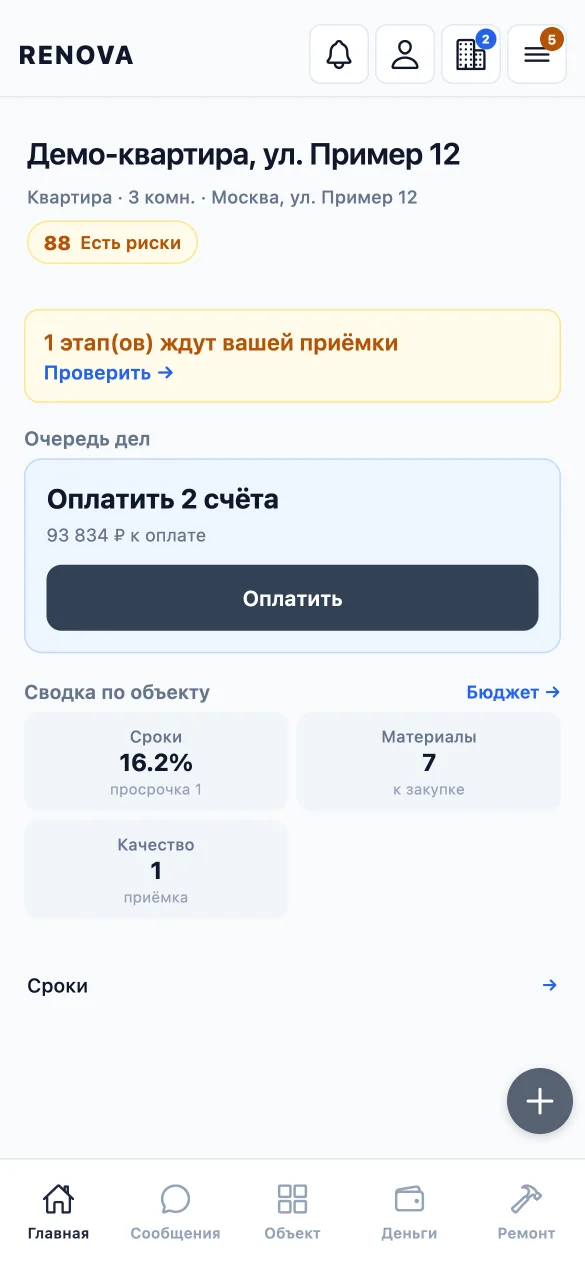
Built: the estimate, stages with sign-off, chats and an offline mode; the payment flow is built; live payments are not connected. The receipt and self-employed status check via the Federal Tax Service is so far worked out on a simulation; the live check goes on once access is granted. Full scope of work: section 06.
Summary
- The estimate drifts from actual costs, and overspend surfaces only at the end.
- The contractor’s status goes unchecked, and no one is accountable for the result.
- Renova pulls everything into one flow: a gap between estimate, actuals and payment shows at the moment it appears.
01 — The problem
Renovations run on chat threads, and no one is accountable
The economics of a renovation are never in one place: the estimate in a file, the conversation in a messenger, the receipts in a pile.
-
The estimate drifts from actual costs
The estimate lives in a file; purchasing and payments sit elsewhere. Every small difference piles up unseen until it becomes an overspend.
-
Payment is not tied to results
Payment follows a verbal agreement rather than a signed-off stage. What exactly was paid for cannot be checked later.
-
The contractor’s legal status is unconfirmed
Self-employed or sole-trader status is taken on trust and, as a rule, not checked at the time of payment.
-
Whether a stage is finished is a matter of trust, not fact
The crew and the client mean different things by “done”, and there is no shared confirmation. Photos, if any, stay in a phone gallery, not linked to a stage or date.
Outcome: the client learns the real cost of the renovation only after the money has been spent.
02 — The principle
Every action recalculates the figures
-
The estimate is a state, not a document
Every change to the estimate is saved as a new version. You can see what changed, when, and why the plan departed from actual costs.
-
Payment is tied to sign-off
A stage payment is confirmed only after sign-off, with photo evidence and confirmation from both sides.
-
Checks go to official sources
In the intended flow, receipts and self-employed status are matched against Federal Tax Service data rather than accepted on the contractor’s word, and the result decides whether this contractor can be paid. For now this is worked out on a simulation.
03 — Scope
From estimate to signed-off result
The system holds the order of steps: until a stage is signed off, its payment cannot be confirmed, and every change to the estimate leaves a trace.
- Estimate
- Version approval
- Work on the stage
- Photo evidence
- Sign-off
- Payment
- Next stage
04 — Roles
Client and contractor each get their own screens
The client and the contractor see the same site, but each sees their own part.
-
Client
Sees the whole estimate, its versions and deviations, stage status and payment history. Signs off a stage or rejects it with a comment.
-
Contractor or crew
Runs their own area: photographs the stage, requests sign-off and confirms receipt of payment.
-
Renovation company
Runs several sites at once and sees the estimate, stages and payments for each.
05 — Interface
The app on screen
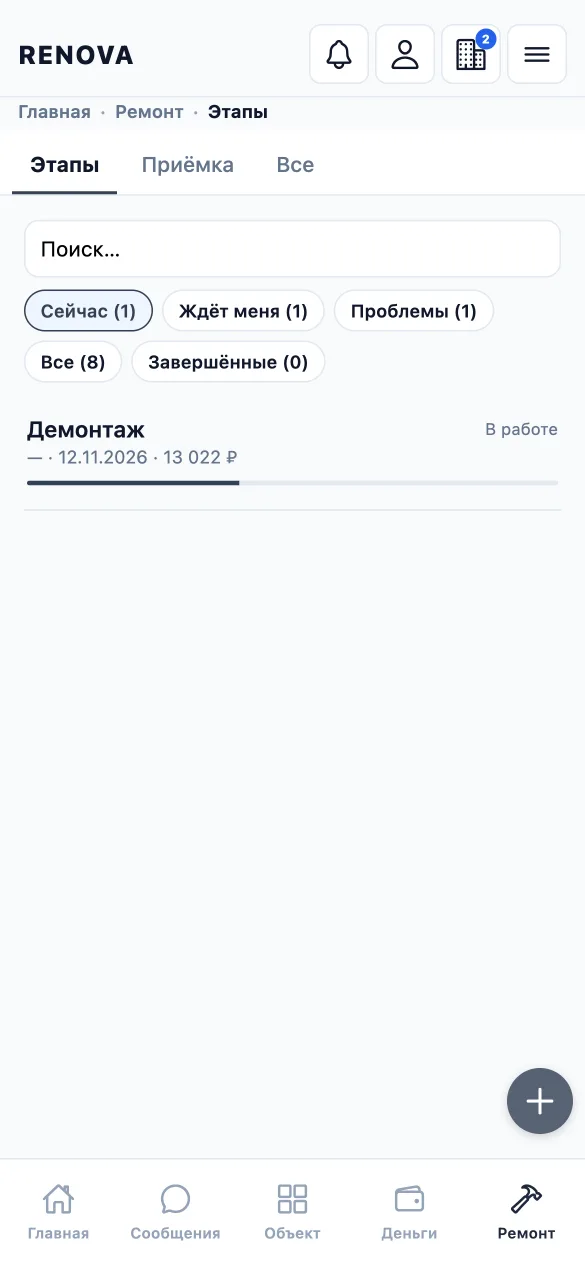
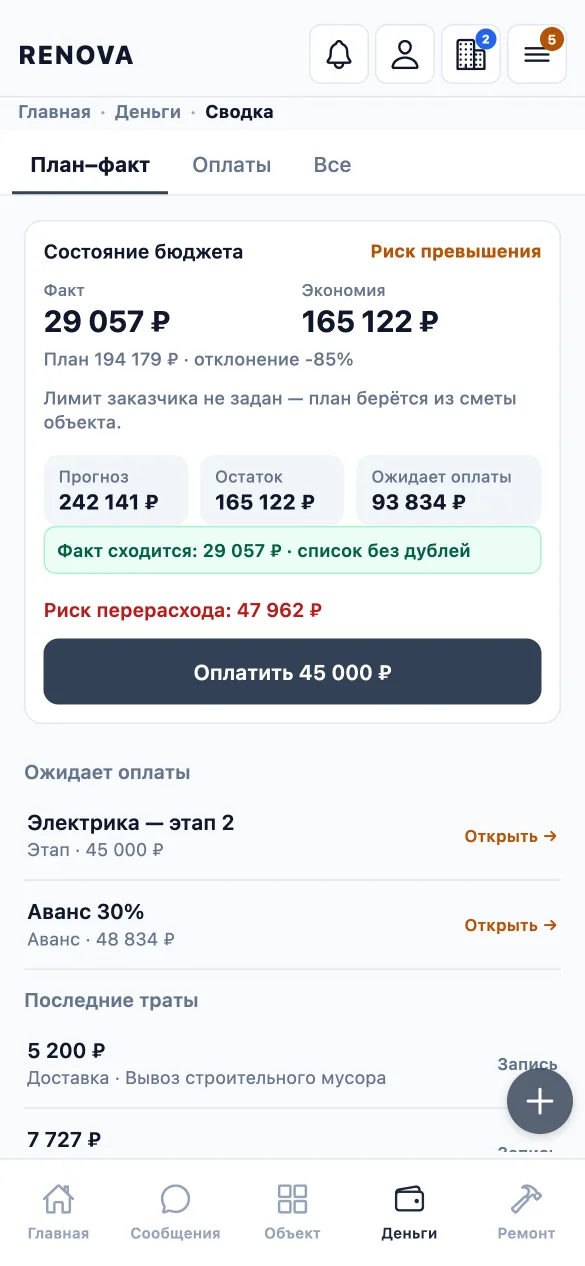
A video and screens of the prototype: estimate, work stages, payments. The app can already be shown in use, not just described. Phone first: a renovation is run on site, not at a desk.

06 — Stage
The prototype is built; a closed test is next
Done
- Norm-based estimates with versions and plan-versus-actual comparison
- Work stages: handover and sign-off, photo evidence, technical supervision, warranty claims
- The payment flow is built; live payments are not connected: payment schedules, confirmation with evidence, disputes, invoices for extra work
- Client, contractor and link-based guest roles; chats per project and stage; a notification centre
- Project participant management and turning a lead into a project
- Purchasing and materials with prices, documents, and offline use with a queue of actions
- Receipt and self-employed status checks via the Federal Tax Service: worked out on a simulation; the live check goes on once access is granted
In progress
- Preparing a trial version for the first users
- Completing the independent contractor flow
- Safely resending queued actions after a dropped connection, with no duplicates
- Reviewing every screen and fixing what turns up
Next
- Server deployment and a closed test on real projects
- Live payments and the “My Tax” service for the self-employed
- Push notifications on phones
- App Store publication after legal preparation
Looking for. Contractors, crews and clients for a closed test on a real site — and investors and partners to develop the product with me, from the closed test to market launch.
07 — Involvement
Ways to get involved
I show how the system is built and the roadmap in person.
Next: project details
Modules, scenarios, roles, what already works and what is next, a gallery and the way into the app.